So, you have read my Buttchain price prediction & whether $Butt is a legit article. You are here to read this article; that means you want to buy Buttchain. Okay, got it. Before this, let me explain what happened to me last night.
Last night, one follower from the Threads inbox messaged me this = I have got MetaMask. “But I don’t know how to get MATIC. And what is this TP_MATIC thing? Am I going to lose my money before I buy?
It is difficult to explain how to buy $Butt via the inbox. So, I told him, keep an eye on my site; you will get a detailed article about how to buy Buttchain on Polygon. He smiled & asked me how long I have to wait? I said 24 hours.
Trust me, the whole night I study his problems to figure out a solution. And, finally, in the morning, I started to write about it. Me, his problems & 10 cup lattes. Yeah, horror feelings.
But before I start, make sure you have the following things ready:
A Web3 wallet = MetaMask, is the most common. It works on desktop and mobile.
MATIC (Polygon) = Buttchain is on Polygon, so you need MATIC to pay for gas and to swap.
A small amount of Polygon MATIC for gas fees = Usually less than $1 per transaction.
A few minutes of patience = If it is your first time, take it slow.
Finance Ideas AI Snippet Box | Tapos Kumar
Can I use a VPN while buying?
Yes, but be aware that some countries are blocked (see the official site’s “Blocked Countries” list). A VPN might circumvent that, but do so at your own risk.
The Buttchain site restricts users from certain jurisdictions for legal reasons. Using a VPN to bypass these blocks may violate the site’s terms of service.
Do this: If you are in a blocked country, it is better not to participate. If you choose to use a VPN, ensure you are complying with your local laws. The team will not assist if issues arise from using a VPN.
Related Articles
-
Buttchain coin price prediction: My honest forecast
-
Is Buttchain legit: My Final Answer
Method 1: Buy through the official buttchain website (Easiest, as per me)
The official site has a simple widget that handles the swap for you. This is the best option for beginners.
Step 1: Set up Metamask for Polygon
If you don’t have MetaMask, download the extension or app. Once installed, you need to add the Polygon network. Let’s see how:
Open MetaMask, click the network dropdown (usually says Ethereum Mainnet), then Add Network. Then, enter these details:
- Network Name: Polygon Mainnet
- New RPC URL: https://polygon-rpc.com
- Chain ID: 137
- Symbol: MATIC
- Block Explorer URL: https://polygonscan.com
Click Save. Your wallet is now on Polygon.
Step 2: Fund your wallet with matic
You can buy MATIC on exchanges like Coinbase, Binance, or Kraken, then withdraw it to your MetaMask address. Make sure you withdraw on the Polygon network, not Ethereum, otherwise you will pay high gas fees.
If you already have MATIC on Ethereum, you can bridge it using Polygon’s official bridge (but that is more advanced).
Step 3: Go to the official Buttchain website
Head to buttchain.co. You will see the swap widget right on the homepage.
Click Connect Wallet and select MetaMask. Approve the connection.
Step 4: Enter the amount and buy
In the widget, select the amount of MATIC you want to spend. The widget will show you how much BUTT you will receive after the 10% swap tax. (Buy tax: 5% referral, 2.5% auto‑liquidity, 2.5% burn.)
Click “Buy”, review the transaction, and confirm in MetaMask. Wait a few seconds for the transaction to finalize.
Step 5: Add BUTT to your wallet
After purchase, you won’t see BUTT in your wallet automatically. You need to add the token manually. In MetaMask, click Import Tokens (or Add Token). Then, select the custom token and enter:
- Contract Address: 0xc009b6c310fC0C9c93E0CAF0318759037cCD8FC2
- Token Symbol: BUTT
- Decimals: 18
Click Add Custom Token. Now you will see your BUTT balance.

Method 2: Buy directly on Uniswap V3 (For advanced users)
If you prefer using Uniswap directly, you can swap MATIC for BUTT using the official liquidity pool. Follow the steps:
- Go to app.uniswap.org and connect your wallet (make sure you are on the Polygon network).
- In the swap interface, select MATIC as the token you pay with.
- For the token you receive, paste the BUTT contract address:
- 0xc009b6c310fC0C9c93E0CAF0318759037cCD8FC2
- Uniswap will auto‑fill the token details. Enter the amount of MATIC you want to swap.
- Review the transaction. The quote includes the 10% tax (it is built into the price).
- Confirm the swap in MetaMask.
Warning: Always verify you are using the correct contract address. Scammers often create fake tokens with similar names.
Generating your referral link (Share & Earn)
One of Buttchain’s unique features is the 5% referral reward. Anyone who uses your unique link to buy Buttchain will pay the 5% referral tax, and you receive that 5% as BUTT tokens.
To get your link:
- On the official website, after connecting your wallet, look for the “Share & Earn” section.
- Click “Generate Unique Link”.
- Copy the link and share it. You will earn 5% of the purchase amount (in BUTT) whenever someone buys through that link.
My tip: Share your link in crypto communities, on social media, or even with friends, but don’t spam. Remember that organic shares work best.
I detected common problems & how to fix them?
| Problem | Solution |
| Transaction stuck or pending | Check that you have enough MATIC for gas. If it is pending too long, you can try increasing the gas fee in MetaMask. |
| Wallet doesn’t show BUTT after purchase | You need to add the custom token using the contract address (see Step 5). |
| Insufficient liquidity error | Wait a few minutes and try again. The pool might be experiencing high traffic. |
| I can’t connect my wallet | Make sure you are on the Polygon network and that your wallet extension is up to date. Try clearing browser cache. |
| I bought but received fewer tokens than expected | The 10% tax is applied on swaps. The amount shown in the widget already factors it in. |
Security Checklist (Do this before you buy)?
Use the official website = Only https://buttchain.co. Scammers create fake sites.
Verify the contract address = Double‑check it on Polygonscan: 0xc009b6c310fC0C9c93E0CAF0318759037cCD8FC2
Never share your seed phrase = No one from Buttchain will ask for it.
Start small –=Test with a small amount first to ensure everything works.
Bookmark the official site, = So you don’t accidentally visit a phishing site.
Tax implications for US investors (IRS guidance)?
The IRS treats cryptocurrencies as property. Therefore, it is not a taxable event when you buy Buttchain. But when you later sell or swap, you will owe capital gains tax on any profit. Let’s see the details:
- Short‑term gains (held less than a year) are taxed as ordinary income.
- Long‑term gains (held more than a year) benefit from lower rates.
- Referral earnings are considered taxable income at the time you receive them (fair market value in USD). Keep records of every transaction.
According to the SEC’s March 2026 guidance, meme coins like Buttchain are digital collectibles, & this is not securities. So, you won’t have to worry about securities reporting, but tax rules still apply. You may doubt me; so, if you have time, you can check it. How, pause my article, & check online or offline this = IRS Publication 544, Sales and Other Dispositions of Assets. Got it, I always write neutral & according to the US government’s instructions. This is because crypto is a risky investment, & trust others need reliable information.
I conducted a case study on how my Threads follower bought $500 $Butt?
My Thread follower first tried to buy; he made two mistakes:
- He forgot to add the Polygon network to MetaMask and was on Ethereum.
- He tried to send MATIC directly to the contract address.
After the screenshot exchange, we corrected both. He added the Polygon network, bought MATIC on Coinbase, and withdrew it to his MetaMask on Polygon (using the correct network). Then he went to the official site, connected, and swapped. The whole process took about 10 minutes once he had the right setup.
He now holds 62,000 BUTT and jokes about his toilet paper investment. He also generated his referral link and earned a small amount back from friends & colleagues who bought using his link.
Key lesson: Take your time, verify everything, and start with a test transaction.
Finance Ideas TL; DR | Tapos Kumar
- Install MetaMask and add the Polygon network.
- Fund your wallet with MATIC (Polygon’s native token).
- Go to the official site (Buttchain. Co) and connect your wallet.
- Enter the amount of MATIC you want to swap, confirm the 10% tax, and approve the transaction.
- Add the BUTT contract address to your wallet to see your balance.
- (Optional) Generate your unique referral link to earn 5% on future purchases.

My tips:
- Start with a small test ($10–$20) to confirm everything works.
- Keep at least 0.5 MATIC in your wallet for future gas fees.
- If you get stuck, check the official FAQ on the site or email support@buttchain.co (the team never DMs first).
Keep scrolling for step‑by‑step screenshots and detailed answers to every question you didn’t know you had.
Download Free Resources (Pdf) without E-mail
Frequently Asked Questions (FAQ) about how to Buy Buttchain on Polygon?
Can I buy Buttchain using Coinbase or Binance directly?
No. Buttchain is not listed on centralized exchanges like Coinbase or Binance. You must use a Web3 wallet and swap on the official site or Uniswap.
Centralized exchanges (CEXs) have strict listing criteria. Buttchain is a newer meme coin that trades primarily on decentralized exchanges (DEXs) like Uniswap V3. This is normal for emerging tokens. Buying through a DEX gives you direct ownership without an intermediary.
My advice: If you are used to CEXs, the extra steps might feel unfamiliar, but they give you full control. Always start with a small test transaction to ensure everything works before committing larger amounts.
Do I need to convert MATIC to something else before swapping?
No. The widget accepts MATIC directly. On Uniswap, you swap MATIC for BUTT. The TP_MATIC token is used internally by the contract; you don’t need to interact with it.
TP_MATIC (Toilet Paper Matic) is Buttchain’s custom-wrapped MATIC token. It is part of the smart contract’s tax collection mechanism, but as a buyer, you don’t need to hold or swap it. The official site and Uniswap handle it automatically.
My advice: If you see TP_MATIC in your wallet after a swap, don’t be alarmed; it is a residual from the transaction. You can ignore it or hide it. Focus on your BUTT balance.
What is the 10% tax – do I pay it when I buy and when I sell?
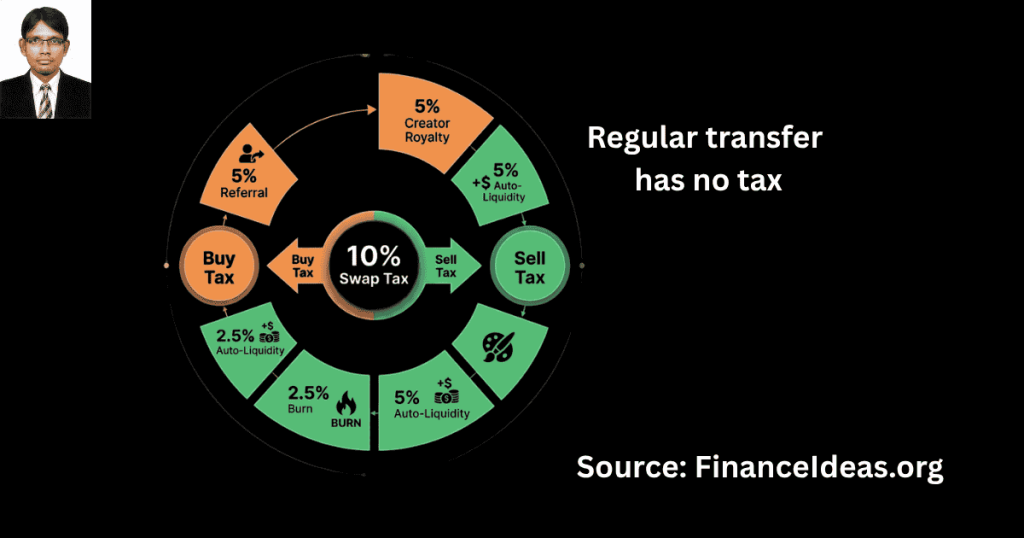
Yes. Both buying and selling on the liquidity pool incur a 10% tax. Regular transfers between wallets have no tax.
The tax is applied only to swaps that affect the liquidity pool. The breakdown is:
Buy tax = 5% referral, 2.5% auto‑liquidity, 2.5% burn.
Sell tax =5% creator royalty, 5% auto‑liquidity.
If there is no referral used, the 5% referral portion on buys is burned instead.
My advice: Factor this tax into your trading strategy. If you buy and sell quickly, you will lose 10% on each swap. Longer‑term holding reduces the impact. Always check the quoted amount before confirming.
I bought BUTT, but it is not showing in my wallet. Help!
You must manually add the token using the contract address. MetaMask (and most wallets) won’t automatically display new tokens.
Web3 wallets only show tokens you have explicitly added. You need to import the custom token using the contract address:
0xc009b6c310fC0C9c93E0CAF0318759037cCD8FC2
My suggestion: In MetaMask, click “Import Tokens” → “Custom Token” and paste the address. The symbol (BUTT) and decimals (18) will auto‑fill. Once added, your balance appears. Bookmark the contract address so you don’t have to search each time.
Can I use Trust Wallet instead of MetaMask?
Yes. Trust Wallet supports Polygon. You can connect it to the official site via WalletConnect.
Trust Wallet is a popular mobile wallet. It works similarly to MetaMask but with a different interface. You will need to add the Polygon network manually in Trust Wallet settings, then use the WalletConnect option on the Buttchain site to pair.
My suggestion: If you are using Trust Wallet, make sure you have MATIC on the Polygon network. You can buy MATIC directly in Trust Wallet or transfer from an exchange. The steps are the same as MetaMask once connected.
How much MATIC do I need for gas?
Hmm, less than $0.10 per transaction. But keep at least $5 worth of MATIC in your wallet to cover several transactions.
Polygon gas fees are fractions of a cent, but you need MATIC to pay them. If your wallet runs out, transactions will fail. Gas fees can spike during network congestion, so a small safeguard protects you.
My tips: After buying BUTT, leave at least 0.5 MATIC in your wallet for future transactions. And, never send your entire MATIC balance to a swap.
Is there a minimum purchase amount for $Butt?
According to my study, no official minimum, but very small buys might be eaten by gas fees and the 10% tax.
The smart contract doesn’t enforce a minimum. However, if you buy $5 worth, you will lose roughly $0.50 to the tax plus $0.10 in gas. That is a 12% effective cost. A $50 purchase reduces that percentage significantly.
My suggestion: If you are testing, use $20–$50 to get a realistic feel. For long‑term holding, a larger buy makes the fees proportionally smaller.
What is the difference between buying on the site vs. Uniswap?
The site widget is simpler and automatically uses the correct pool. Uniswap gives you more control but requires entering the contract address manually.
The official site uses the same Uniswap pool behind the scenes but pre‑populates the correct contract address and simplifies the interface. Uniswap lets you adjust slippage, see detailed pool info, and use advanced features.
My tips: For beginners, use the official site. It is designed to be foolproof. Once you are comfortable, you can experiment with Uniswap for more control.
How do I know I am on the real Buttchain site?
The official URL is https://buttchain.co. Check the SSL certificate (lock icon in the address bar). Never click links from Telegram or unsolicited DMs.
Scammers create fake sites that look identical. They often use domains like buttchain.net or buttchain‑official.com. Always type the URL yourself or use a bookmarked link.
My suggestion: Bookmark the official site after your first visit. If you receive a link in a DM, assume it is a scam. The team will never contact you first.
Can I buy Buttchain from a hardware wallet like Ledger?
Yes. Connect your Ledger to MetaMask, then follow the same steps. Make sure you are on the Polygon app on your Ledger.
Hardware wallets store your private keys offline. MetaMask acts as the interface. You will need the Polygon app installed on your Ledger, and MetaMask must be set to “Hardware Wallet” mode.
My suggestion: Test with a small amount first to confirm the connection works. Always verify transaction details on your Ledger screen before approving.
What happens if I send MATIC to the Buttchain contract address?
Don’t do that. The contract address is for the token itself, not a receiving wallet. Always use the swap widget or Uniswap.
The contract address (0xc009…8FC2) is where the BUTT token lives on the blockchain. It is not a personal wallet. Sending MATIC there will likely result in permanent loss.
My suggestion: Copy the contract address only to import the token into your wallet. For swapping, always use the official site or Uniswap’s interface. Never send funds directly to a contract address.
How long does the transaction take?
Usually 10–30 seconds on Polygon. If it is longer, check the network status and your gas settings.
Polygon blocks are fast. Delays usually come from low gas settings or network congestion. MetaMask sometimes estimates low gas to save you money, but that can cause pending transactions.
My tips: If your transaction is stuck, you can speed it up in MetaMask by clicking Speed Up and increasing the gas fee slightly. Avoid cancelling unless necessary.
I generated my referral link. When do I get paid?
Referral rewards are distributed automatically when someone buys using your link. The 5% referral tax is taken from the buyer’s purchase and sent to your wallet.
The smart contract allocates 5% of their purchase (in BUTT) directly to your wallet when a buyer uses your unique link. You don’t need to claim it; it arrives at the same time as their transaction.
Do these: You can track your referral earnings by checking your BUTT balance over time. Share your link in communities where you are genuinely active. Spamming won’t work and may get you banned.
Is it safe to keep BUTT in my MetaMask?
Yes, as long as you keep your seed phrase secure and only interact with verified contracts. For long‑term storage, consider a hardware wallet.
MetaMask is a hot wallet (connected to the internet), which is convenient for trading but less secure than cold storage. If your computer is compromised, funds could be stolen.
My tips: For holdings you don’t plan to trade frequently, move them to a hardware wallet like Ledger. Never store your seed phrase digitally; write it down and keep it offline.
Do I need to report my Buttchain purchase on my taxes?
Buying is not a taxable event. But you must track your cost basis for when you sell. Use a crypto tax software to stay compliant.
The IRS treats crypto as property. Buying with cash is not a taxable transaction. However, when you later sell or swap, you will owe capital gains tax on any profit. Referral earnings are taxable as income at the time you receive them.
My suggestion: Keep a spreadsheet of every transaction: date, amount, cost basis, and proceeds. Use tools like CoinTracker or Koinly to generate tax reports. Consult a CPA if you are unsure.
What is the difference between Buttchain and Buttcoin on Solana?
They are separate projects. Buttchain is on Polygon with a fixed 250M supply; Buttcoin is on Solana with a 1B supply. This article is for Buttchain only.
Both are meme coins with similar names but completely different ecosystems. Buttchain focuses on auto‑liquidity and referral mechanics; Buttcoin on Solana has a different community and tokenomics.
My suggestion: Always verify the contract address before buying. If you are unsure which project you are looking at, check the blockchain = Buttchain is on Polygon, contract 0xc009…8FC2.
The website says “Seppuku” – what is that?
It is a meta‑transaction function that allows you to burn your own tokens if your wallet is compromised. It prevents scammers from dumping your tokens. Use it only if necessary.
Seppuku is a unique feature of Buttchain (they don’t directly talk about it, but their features support it). If your wallet is hacked, you can trigger a gas‑free transaction that permanently burns all BUTT in your wallet. This stops thieves from selling your tokens. It is irreversible.
My suggestion: This is a last‑resort feature. If you suspect your wallet is compromised, first try to move remaining funds to a new wallet. Only use Seppuku if you have already lost control and want to deny the hacker any value.
I bought BUTT, but now I can’t see it on Uniswap. Why?
Uniswap will not automatically show BUTT in the token list. You need to paste the contract address to trade.
Uniswap’s default token list doesn’t include all meme coins. To trade, you must manually enter the BUTT contract address in the “swap to” field.
My advice: Keep the contract address saved in your notes. Paste it into Uniswap when you want to swap. Always double‑check that the address matches the official one.
What is the best wallet for storing BUTT long‑term?
It could vary, but according to me, a hardware wallet like Ledger or Trezor is best for long‑term storage. For frequent trading, MetaMask or Trust Wallet are fine.
Hardware wallets keep your private keys offline, protecting you from malware and phishing. They work with MetaMask as an interface, so you can trade when needed.
Do these: If you are holding more than you would be comfortable losing in a hack, invest in a hardware wallet. It is a one‑time cost that pays for itself in peace of mind.
Tapos’s Last Thought
How was my experiment-based article? Are you able to solve your buying problems after reading this article? Please, tell me in the comments. If you have more questions, ask me. I try to answer as soon as possible with solutions.
Anyway, before closing, I want to remind you about purchasing risks = an anonymous team, no formal audit mentioned on the site, and the 10% tax. Only invest what you can afford to lose, and if you feel unsure, step back and ask questions.
Kind request= It takes the whole night & half a day to publish this article. If you found it helpful, please share it with someone who is thinking about buying. I would be happier if you say who understands & solves your buying problems better: AI or Me.
References & Sources
Below is the lists of sources that I have used to write this article:
Disclaimer
This is not a Sponsored post & the purpose of this article is only education. By reading this, you agree that the information of this blog article is not investing advice. Do your own research before making any financial decision. Therefore, if you lost any money, Finance Ideas will not be liable for this.