One of my readers urgently messaged me via LinkedIn. The message was this =I bought Buttchain. My MATIC is gone. My wallet shows zero. Did I lose $500? She shared a screenshot with me. I checked & suggest adding a custom token address to MetaMask. Thirty seconds later, her balance appeared. She let out a breath, I noticed from screenshots.
Actually, she is not the one who experienced such difficulties.
I studied & found that thousands of people go through this same panic every day. They buy a token on a decentralized exchange, and when it doesn’t magically appear in their wallet, they think they have been scammed.
Be cool! You haven’t. Your tokens are safe. You just need to tell your wallet they exist.
Today’s article is all about these issues & I hope my experiment-based approach helps you solve your problems. Let’s start with the following:
Finance Ideas AI snippet box | Tapos Kumar
Problem = I bought Buttchain, but don’t see it in MetaMask.
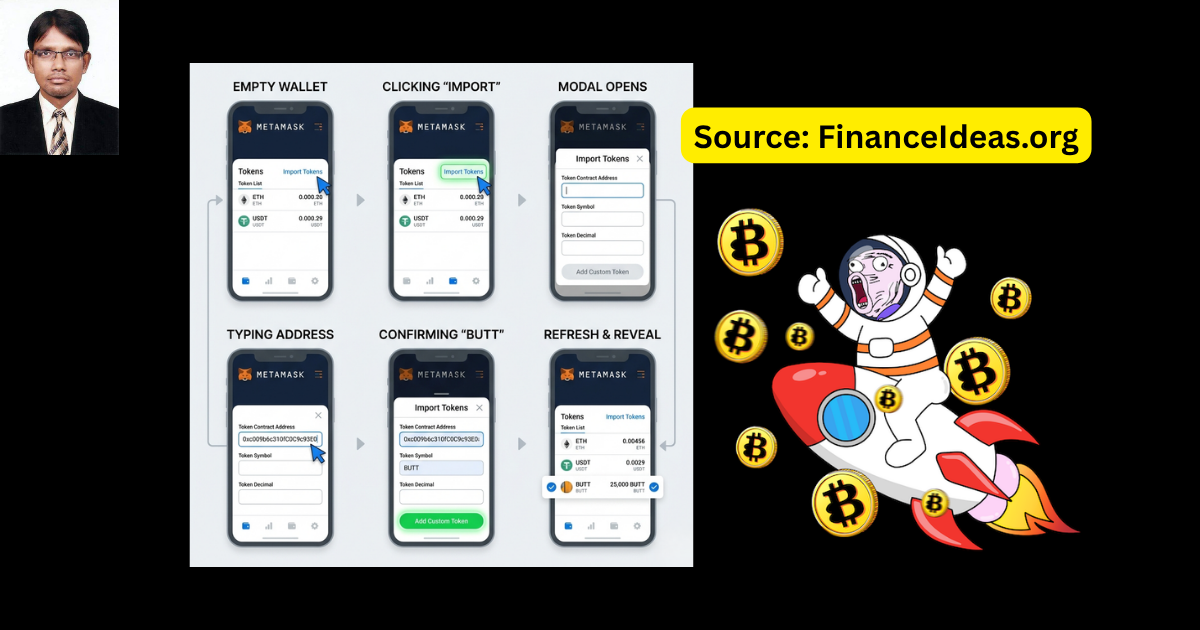
Solution: Manually add the custom token. It will take 15 seconds:
- Copy this address: 0xc009b6c310fC0C9c93E0CAF0318759037cCD8FC2
- In MetaMask, click Import Tokens → Custom Token
- Paste the address. Symbol “BUTT” and decimals “18” will auto‑fill.
- Click “Add Custom Token.”
Your balance will appear instantly. The tokens were always there; you just needed to tell MetaMask where to look.
If you don’t see them yet, check Polygonscan with your wallet address. If Polygonscan shows the tokens, they are safe. The issue is with your wallet’s interface; so, try refreshing or using a different browser.
Related Articles
-
How to buy Buttchain on polygon: The Complete Beginner’s Guide (2026)
-
Buttchain coin price prediction: My honest forecast
-
Is Buttchain legit: My Final Answer
How to add BUTT to MetaMask?
You can add $Butt in 3 ways. But before you start, make sure that you have the following things:
- Your MetaMask wallet (or any Web3 wallet that supports Polygon)
- The official Buttchain contract address (copy it exactly):
- 0xc009b6c310fC0C9c93E0CAF0318759037cCD8FC2
- A few seconds of patience (seriously, that is all it takes)
Method 1: Add via the official Buttchain website (Easiest)
The Buttchain team has made this incredibly simple.
- Go to buttchain.co and connect your wallet.
- Look for a button or link labeled “Add BUTT to Wallet” (often in the swap widget or the “How to Buy” section).
- Click it. MetaMask will pop up asking for permission to add the token.
- Confirm. Your BUTT balance will now appear in MetaMask.
This is the best method for beginners because it is impossible to mess up the contract address.
Method 2: Manual add using the contract address (Universal method)
If you don’t see the “Add to Wallet” button, or you are using a different wallet, this method works everywhere.
On MetaMask (Desktop browser extension):
- Open MetaMask and make sure you are on the Polygon Mainnet network (not Ethereum).
- Scroll down to the bottom of your asset list and click “Import Tokens”.
- Select the “Custom Token” tab.
- In the “Token Contract Address” field, paste this address:
- 0xc009b6c310fC0C9c93E0CAF0318759037cCD8FC2
- MetaMask will usually auto‑fill the “Token Symbol” (BUTT) and “Token Decimals” (18). If not, enter them manually.
- Click “Add Custom Token”, then confirm.
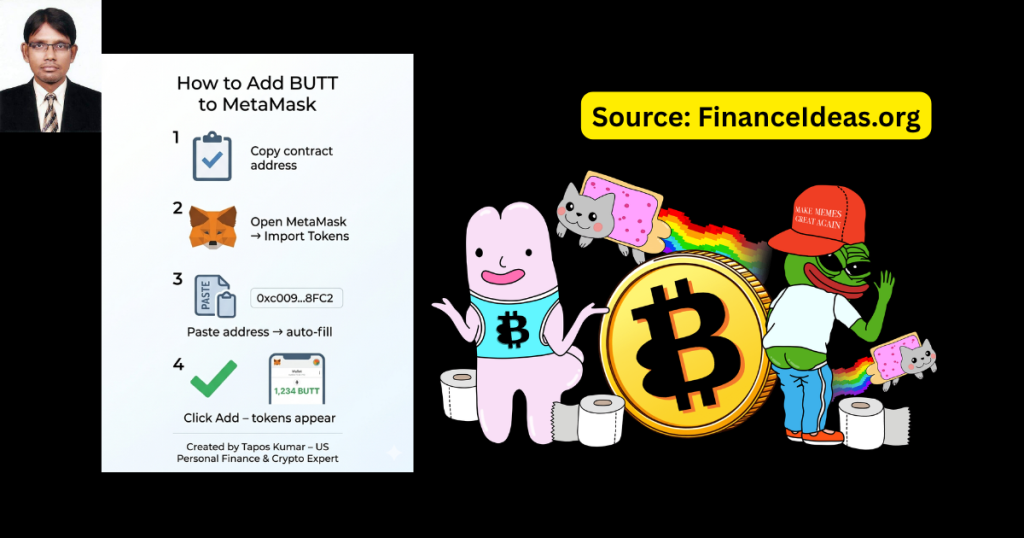
Your BUTT balance will now appear in your wallet.
On MetaMask Mobile App:
- Tap the “Tokens” tab at the bottom.
- Scroll to the bottom and tap “Import Tokens”.
- Tap “Custom Token” and paste the contract address.
- The symbol and decimals will auto‑fill. Tap “Import”.
On Trust Wallet (Mobile):
- Tap the filter icon (top‑right of the token list).
- Tap “Add Custom Token”.
- Select Polygon as the network.
- Paste the contract address. The symbol and decimals will auto‑fill.
- Tap “Save”. Your BUTT will now appear.
Method 3: Add via Polygonscan (For the tech‑savvy)
This is the most “blockchain native” way and is a great way to verify the contract.
- Go to Polygonscan.com and search for the BUTT contract address.
- On the contract page, look for a small icon that looks like a MetaMask fox or a “…” menu.
- Click “Add to MetaMask”.
- MetaMask will pop up asking for permission. Confirm.
This method is useful because you can see the contract’s transaction history and verify its code before adding it.
How to check your BUTT balance and verify your purchase?
Once you have added the token, checking your balance is simple.
In MetaMask:
Your BUTT balance will appear alongside your MATIC and other tokens. If it still shows zero, you may need to refresh the page or restart the extension.
On Polygonscan (For extra verification):
- Go to Polygonscan.com.
- Paste your wallet address into the search bar.
- Under the “Token Holdings” section, you will see all the tokens in your wallet, including BUTT.
- Click on the BUTT token to see your balance and transaction history.
This is the ultimate “proof” because Polygonscan reads directly from the blockchain. If your tokens show up here, they exist. If they don’t show up in MetaMask after that, the issue is with your wallet interface.
What to do if you still don’t see your BUTT (Troubleshooting flowchart)?
In this situation, make sure to do the following things:
Did you just buy the tokens? Transactions can take a few seconds to finalize. Refresh after 30 seconds.
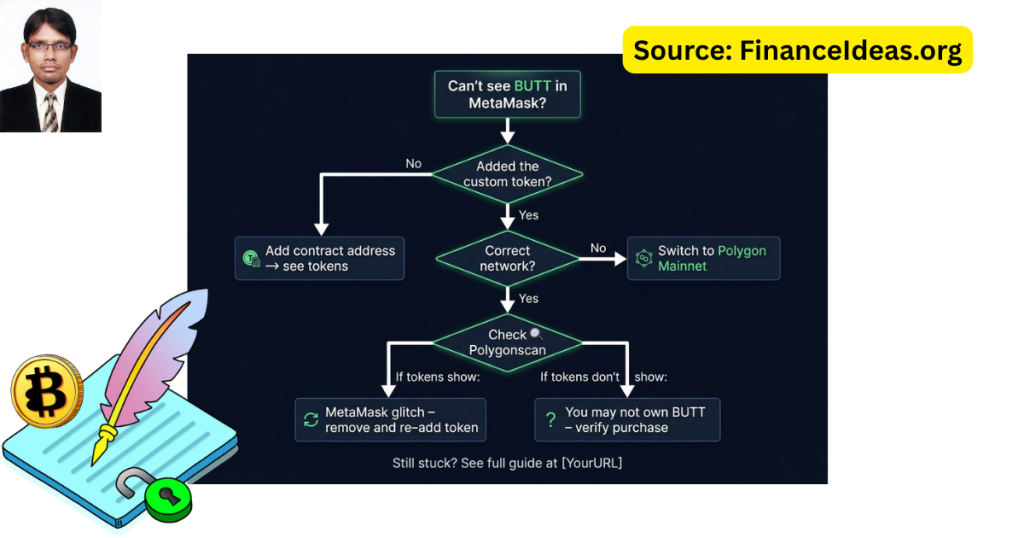
Are you on the wrong network? Make sure MetaMask is set to Polygon Mainnet, not Ethereum.
Did you use the correct contract address? Double‑check it: 0xc009b6c310fC0C9c93E0CAF0318759037cCD8FC2.
Did you accidentally send MATIC to the contract address? If so, your funds are likely lost. Never do that.
Did you import the token but still see zero? Try removing the token and adding it again. Sometimes MetaMask glitches.
Check Polygonscan. If Polygonscan shows the tokens, they are safe. The issue is with your wallet’s interface. Try clearing your browser cache or using a different browser.
Finance Ideas TL; DR | Tapos Kumar
Most crypto investors think their crypto lives inside their MetaMask wallet. It doesn’t.
Your tokens live on the blockchain, which is a public ledger. MetaMask is just a pair of glasses that lets you see what is already there. When you buy a new, lesser‑known token like Buttchain (BUTT), MetaMask doesn’t automatically know to look for it. You have to give it the token’s address so it knows where to look.
Think of it like this: You buy a comic book. It is safely stored in a vault (the blockchain). But your glasses (MetaMask) only show you Marvel and DC comics by default. You have to tell your glasses, “Hey, also show me this indie comic called Buttchain.” Once you do, you will see it sitting right there.
Free Download resources
Frequently Asked Questions (FAQ) about how to add $BUTT to MetaMask and check your balance?
I added the token, but it still shows zero. What now?
First, check Polygonscan to confirm the tokens are actually there. If they are, remove the token from MetaMask and add it again. Sometimes MetaMask needs a refresh.
MetaMask occasionally fails to load token balances correctly, especially after a network switch. Removing and re‑adding the token forces a fresh read from the blockchain.
My advice: If you are still stuck, try using MetaMask in a different browser or clearing your browser cache. For mobile, restart the app.
I see BUTT in MetaMask, but the dollar value is missing. Why?
MetaMask doesn’t have a built‑in price feed for every token. It only shows dollar values for major tokens. BUTT is a newer meme coin, so the price may not appear.
Actually, the dollar value comes from a third‑party price oracle. If the token isn’t listed on major aggregators like CoinGecko or CoinMarketCap, MetaMask won’t have a price.
My suggestion: Use DexScreener or CoinGecko to track BUTT’s price. In MetaMask, you can see the number of tokens you hold.
What is the correct contract address? I am scared of fake tokens.
The only official contract address for Buttchain (BUTT) on Polygon is:
0xc009b6c310fC0C9c93E0CAF0318759037cCD8FC2
This address is verified on the official Buttchain website and on Polygonscan. Scammers often create fake tokens with similar names but different addresses.
My advice: Always verify the contract address from two independent sources: the official website and Polygonscan. Never trust an address from a Telegram DM or a random tweet.
I added the token, but now I see two BUTT entries. Which is real?
One is likely a scam token. Remove both and re‑add only the official contract address.
Scammers sometimes create fake tokens with the same symbol. They hope you will accidentally interact with their malicious contract.
My suggestion: Before adding any token, verify the contract address on Polygonscan. Look for the “Verified Contract” checkmark and a reasonable number of holders.
Can I add BUTT to my hardware wallet like Ledger?
Yes. Connect your Ledger to MetaMask, then follow the same “Import Tokens” steps. The BUTT will appear under your Ledger account in MetaMask.
Hardware wallets store your private keys offline. MetaMask acts as the interface. Adding the token in MetaMask makes it visible on the Ledger account.
My tips: Make sure your Ledger is on the Polygon app. If you don’t see the token, try adding it directly in Ledger Live (if supported).
I bought BUTT on Uniswap. Do I need to add it to MetaMask?
Yes. Uniswap doesn’t automatically add tokens to your wallet. You need to import the contract address.
Uniswap is a trading interface. MetaMask is a wallet. They are separate. The swap occurred on the blockchain, but your wallet needs the token’s address to display it.
My suggestion: Keep the contract address saved in your notes. Paste it into MetaMask whenever you buy a new token.
My BUTT balance disappeared after I switched networks. Is it gone?
No. You just switched away from Polygon. Your tokens are still on Polygon. Switch back to Polygon Mainnet to see them. Each blockchain is like a different country. Your tokens live in “Polygon country.” If you switch to Ethereum or BNB Chain, you won’t see them.
My suggestion: Bookmark your most used networks in MetaMask. Always check your network before panicking.
How do I remove a fake or unwanted BUTT token from MetaMask?
In MetaMask, hover over the token and click the three dots. Select “Hide” or “Remove.” This doesn’t affect your real tokens.
Hiding a token simply removes it from your view. It doesn’t send tokens anywhere or change your balance.
My tips: Before hiding a token, verify its contract address. If it is a scam token, you may want to report it to the community.
I see BUTT in MetaMask, but I want to see the dollar value. Any tool?
Use DexScreener. Paste the BUTT contract address into DexScreener to see the current price, chart, and your wallet’s value.
DexScreener aggregates data from decentralized exchanges. It shows real‑time prices and even has a “Wallet” feature that calculates your holdings.
My tips: Bookmark DexScreener’s BUTT page for quick reference. You can also set price alerts.
My friend sent me BUTT, but I don’t see it. What do I do?
Add the official contract address to your wallet. The tokens are already there; you just need to make them visible.
Adding a token doesn’t “receive” anything. It only makes your wallet show what is already on the blockchain.
My advice: Ask your friend for the transaction hash (TXID). Paste it into Polygonscan to confirm the transfer. Then add the token.
I accidentally added the wrong contract address. How do I fix it?
Remove the wrong token from MetaMask (hide it). Then add the correct address. The wrong token was never connected to your real funds.
Adding a fake token address doesn’t give it access to your wallet. It just adds a placeholder. Your real funds are safe as long as you never interact with the fake contract.
Do this: If you are worried, move your MATIC and BUTT to a new wallet. But simply removing the fake token is usually enough.
Does adding BUTT to MetaMask cost gas fees?
No. Adding a custom token is completely free.
Gas fees are only for transactions that change the blockchain (sending, swapping, etc.). Adding a token is a local wallet action.
Mark this: If a website asks for a fee to “add a token,” it is a scam.
I am using Trust Wallet. The steps are different. Help?
In Trust Wallet, tap the filter icon (top‑right of the token list) → “Add Custom Token” → select Polygon → paste the contract address.
Trust Wallet works similarly to MetaMask but has a different interface. The core concept (i.e., pasting the contract address) is the same.
My tips: Trust Wallet sometimes auto‑discovers tokens. If you don’t see BUTT, try restarting the app.
I see BUTT, but the number is wrong (e.g., shows 0.0001 instead of 1000). Why?
You likely have the wrong decimals. BUTT uses 18 decimals. If you added the token with the wrong number of decimals, the balance will be displayed incorrectly.
Decimals tell your wallet how to divide the token. For BUTT, 18 is correct. If you entered 6 or 8, the math will be off.
My tips: Remove the token and re‑add it. Let MetaMask auto‑fill the decimals from the contract. Don’t change them manually.
Is there a way to see all my Polygon tokens in one place?
Yes. Use a “wallet tracker” like DeBank or Zapper. Just paste your wallet address, and they will show all your tokens on Polygon.
These tools read the blockchain directly and display all holdings, including tokens you haven’t added to MetaMask.
My advice: DeBank is especially useful for tax purposes because it shows your entire portfolio across multiple networks.
I added BUTT, but now my MetaMask is slow. Is there a fix?
Having many custom tokens can slow down MetaMask. Hide tokens you don’t use often. BUTT itself won’t cause slowdowns.
MetaMask loads every token’s balance when you open it. Too many tokens (especially scam tokens) can cause lag.
My advice: Periodically audit your token list. Hide or remove anything you don’t actively hold.
Can I add BUTT to a wallet that doesn’t support custom tokens (e.g., Coinbase Wallet)?
Coinbase Wallet (the self‑custody app) does support custom tokens on Polygon. The steps are similar to MetaMask.
Most modern Web3 wallets support adding custom tokens; if yours doesn’t, consider switching to MetaMask or Trust Wallet.
My suggestion: If you are using an exchange wallet (like a regular Coinbase wallet), you cannot add custom tokens. You must use a self‑custody wallet for Buttchain.
I see BUTT, but I want to send it to a friend. Will the 10% tax apply?
No. The 10% tax only applies to swaps on the liquidity pool. Regular wallet‑to‑wallet transfers have no tax.
The smart contract only taxes transactions that go through the Uniswap pool. Sending directly to another wallet is a standard transfer.
My suggestion: If you are gifting BUTT, send it directly to your friend’s wallet address. They will receive the full amount.
What is the best way to track BUTT’s price after adding it to MetaMask?
Use CoinGecko or DexScreener. Bookmark the BUTT page. MetaMask may not show the dollar value, but these sites will.
Price tracking is separate from wallet management. Use dedicated tools for charts and prices.
My suggestion: Set up price alerts on DexScreener. You will get a notification when BUTT hits your target.
Tapos’s Last Thought
This is all about this auricle. I hope it solves your problems. Yeah, you could have questions & I would be happy to answer if you ask in comments.
Look, I just explained every step in a verifiable way. I don’t hype projects; I explain how they work so you can make informed decisions. If you found my article useful, then bookmark this page. Also, share it with anyone who is ever panicked over missing tokens. Wish you a profitable Butchain journey.
References & Sources
Below is the lists of sources that I have used to write this article:
Disclaimer
This is not a Sponsored post & the purpose of this article is only education. By reading this, you agree that the information of this blog article is not investing advice. Do your own research before making any financial decision. Therefore, if you lost any money, Finance Ideas will not be liable for this.